
Advanced Kubernetes, Part 1: How a Packet Gets to Your Pod
- Intro
- The rules Kubernetes sets (but doesn’t implement)
- Inside a single node
- Pod to pod, across nodes
- Services: a virtual IP that doesn’t exist
- DNS: how “backend” becomes an IP
- NetworkPolicies: who’s allowed to talk to whom
- When something can’t connect
- Wrapping up
Intro
This is the first post in a series on the parts of Kubernetes that show up once you’re past the basics. I’m assuming you already know what pods, deployments and services are, and have used kubectl enough to break something.
I’m starting with networking because it’s the part I understood least for the longest time. For years my mental model was “I create a Service and traffic arrives at my pods”, and that worked fine until it didn’t. Then I’d be staring at a pod that couldn’t reach another pod with no idea where to even start looking.
So in this post I’ll follow a packet from one pod to another, then through a Service, then into a pod on a locked-down namespace. By the end you should know what each layer does, and which command to run when one of them breaks. My own cluster runs Cilium, so a few examples use it, but most of this applies whatever you run.
The rules Kubernetes sets (but doesn’t implement)
Kubernetes has a short list of networking rules, and every cluster has to follow them:
- Every pod gets its own IP address.
- Any pod can reach any other pod by that IP, on any node, without NAT.
- The IP a pod sees for itself is the same IP everyone else uses to reach it.
That’s a lovely model to build on. You never have to map ports or wonder whether localhost:8080 inside a container is the same as anything outside it.
The catch is that Kubernetes itself doesn’t make any of this happen. There’s no code in the kubelet that wires up pod networking. That job belongs to a CNI plugin, and which one you pick changes how your cluster’s network actually works.
Inside a single node
When a pod starts, the container runtime (containerd, usually) creates a new network namespace for it. A namespace is the kernel’s way of giving a process its own private set of network interfaces, routes and firewall rules. Every container in the pod shares that one namespace, which is why containers in the same pod can talk over localhost.
The runtime then calls the CNI plugin, which does roughly this:
- Creates a veth pair, a virtual cable with one end inside the pod’s namespace (it shows up as
eth0in the pod) and the other end on the host. - Picks an IP for the pod from the node’s range. This part is called IPAM.
- Adds routes on the host so traffic for that IP goes down the right cable.
Most clusters give each node its own slice of the pod network. You can often see it with:
kubectl get nodes -o custom-columns=NAME:.metadata.name,PODCIDR:.spec.podCIDRSome CNIs (Cilium in its default “cluster-pool” mode, for one) hand out ranges themselves and leave that field empty, but the idea is the same: node A gets 10.244.1.0/24, node B gets 10.244.2.0/24, and so on.
If you want to poke at a node’s network directly, kubectl debug can start a pod that shares the node’s network namespace. It’s especially handy on distributions like Talos, where there’s no SSH at all:
kubectl debug node/worker-1 -it --image=nicolaka/netshoot
# then, inside it:
ip route        # one route per local pod, plus routes to other nodes' pod ranges
ip link         # the host ends of the veth pairs
Pod to pod, across nodes
Pods on the same node are easy: the host just routes between the two veth pairs. It gets more interesting when the pods live on different machines.
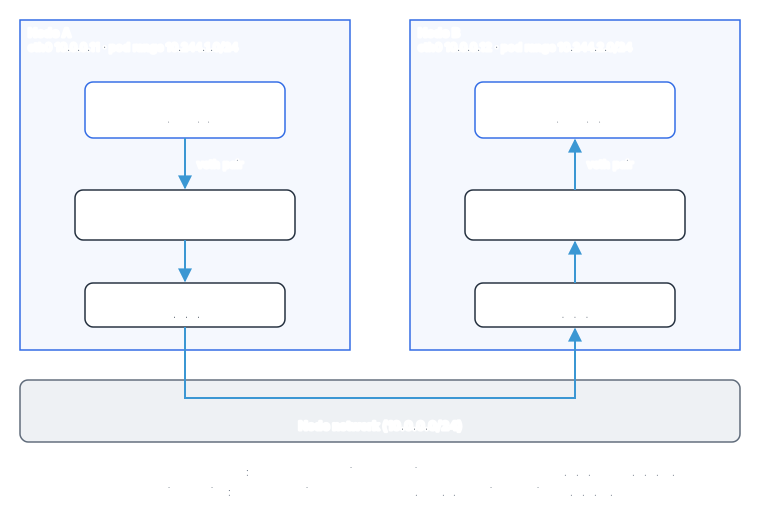
The packet leaves pod-a with a destination of 10.244.2.7. The problem is that the physical network between the nodes has never heard of 10.244.x.x. It only knows the nodes’ own addresses. CNI plugins solve this in one of two ways.
An overlay wraps the pod’s packet inside another packet addressed from node A to node B, usually with VXLAN or Geneve. The network only sees traffic between two nodes, which it already knows how to deliver. Node B unwraps it and hands the original packet to pod-b. Overlays work on almost any network, which is why they’re a common default. The cost is a few extra bytes per packet (so a slightly smaller MTU) and a bit of CPU for the wrapping and unwrapping.
Native routing skips the wrapping. Instead, the network is told which pod range lives behind which node, either through BGP or through the cloud provider’s route tables. Packets travel with their real pod IPs the whole way. It’s faster and easier to debug with ordinary tools, but your network has to cooperate. On AWS, the VPC CNI goes a step further and gives pods real VPC IP addresses, so the VPC itself delivers pod traffic (if you read my VPC post, those pods are just more IPs in a subnet).
What the popular CNIs do
| CNI | How pods talk across nodes | NetworkPolicy support | Worth knowing |
|---|---|---|---|
| Flannel | VXLAN overlay by default | No | Simple and reliable. Often the default (Talos uses it) |
| Calico | BGP routing or overlay | Yes | Very common, mature policy features |
| Cilium | Overlay or native routing, eBPF | Yes | Can replace kube-proxy entirely |
| AWS VPC CNI | Pods get real VPC IPs | Yes (newer versions) | Pod count per node is limited by ENI and IP limits |
That “NetworkPolicy support” column matters more than it looks. We’ll come back to it.
Services: a virtual IP that doesn’t exist
Pods come and go, and every new pod gets a new IP, so you can’t hardcode pod IPs anywhere. A Service gives a group of pods one stable address and a DNS name.
When you create a Service called backend, Kubernetes gives it a ClusterIP like 10.96.12.34. Here’s the part that confused me for ages: that IP isn’t assigned to any network interface, anywhere. You can’t ping it on most setups. It’s a fiction, and something on every node has to quietly translate it into a real pod IP.
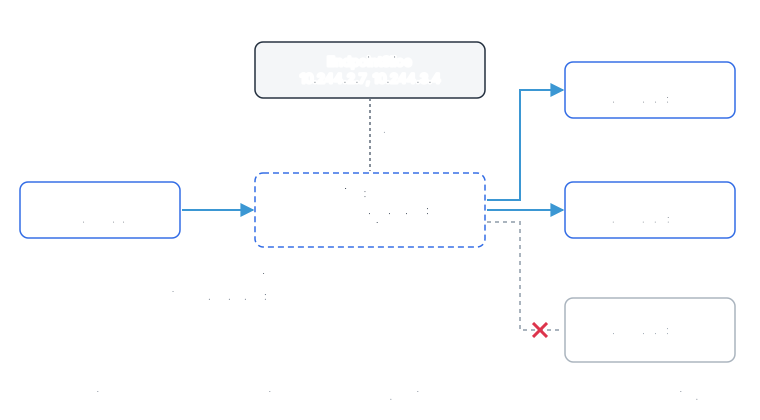
Two pieces make that work. The first is the EndpointSlice, a list of the pods behind the Service that are currently ready. Kubernetes keeps it up to date as pods start, stop and pass or fail their readiness probes. You can see it with:
kubectl get endpointslices -l kubernetes.io/service-name=backend -o wideIf that list is empty, no amount of networking magic will help. Nine times out of ten, a Service that “doesn’t work” has no ready endpoints, usually because the Service’s selector doesn’t match the pod labels or the pods are failing their readiness probe.
The second piece is whatever turns 10.96.12.34:80 into 10.244.2.7:8080 on the way out of the client’s node. Traditionally that’s kube-proxy.
kube-proxy and iptables
kube-proxy runs on every node, watches Services and EndpointSlices, and writes kernel rules to match. In its classic iptables mode, the rules for our backend Service look something like this (simplified, with shortened chain names):
-A KUBE-SERVICES -d 10.96.12.34/32 -p tcp --dport 80 -j KUBE-SVC-BACKEND
-A KUBE-SVC-BACKEND -m statistic --mode random --probability 0.5 -j KUBE-SEP-POD1
-A KUBE-SVC-BACKEND -j KUBE-SEP-POD2
-A KUBE-SEP-POD1 -p tcp -j DNAT --to-destination 10.244.2.7:8080
-A KUBE-SEP-POD2 -p tcp -j DNAT --to-destination 10.244.3.4:8080
Read top to bottom: anything going to the ClusterIP on port 80 jumps to the Service’s chain, which picks one of the pods at random and rewrites the destination (DNAT). The kernel’s connection tracking remembers the choice, so every packet in that connection goes to the same pod, and replies get translated back.
You can look at the real thing from a debug pod on a node:
iptables -t nat -L KUBE-SERVICES -n | grep 10.96.12.34This works well, but iptables rules are checked in order. With thousands of Services, every new connection walks a very long list, and every change means rewriting big chunks of it. Newer clusters can run kube-proxy in nftables mode instead, which handles large numbers of Services much better. If you’re on a recent Kubernetes version and still on iptables mode, it’s worth a look.
Skipping kube-proxy with eBPF
CNIs like Cilium can replace kube-proxy altogether using eBPF, small programs loaded into the Linux kernel. Instead of a long chain of rules, Service lookups become hash table lookups, which stay fast no matter how many Services you have.
Cilium can even do the translation when the application opens the connection: your app calls connect() to 10.96.12.34:80, and the kernel connects it straight to a pod IP. No packet ever carries the ClusterIP. If you run Cilium, you can see its view of Services with:
kubectl -n kube-system exec ds/cilium -- cilium-dbg service listThe trade-off is that your familiar iptables debugging habits stop working. You’ll be using Cilium’s own tools (and Hubble, its traffic viewer) instead.
NodePort, LoadBalancer and the client’s IP address
NodePort and LoadBalancer Services are built on top of the same machinery. A NodePort opens the same port on every node and forwards it to the Service. A LoadBalancer Service asks your cloud (or something like MetalLB at home) for an external IP, which sends traffic to those node ports.
One setting worth knowing here is externalTrafficPolicy. With the default, Cluster, a node that receives traffic can forward it to a pod on a different node. That spreads load evenly, but the extra hop means the source address gets rewritten, so your app sees a node’s IP instead of the real client’s. With Local, nodes only send traffic to pods running on themselves. You keep the client’s IP and lose the extra hop, but nodes without a matching pod drop the traffic, so the load balancer’s health checks have to steer around them.
DNS: how “backend” becomes an IP
Nobody types ClusterIPs. Your app connects to backend, and CoreDNS (running in kube-system) answers. Every Service gets a name like:
backend.shop.svc.cluster.localThat’s the Service name, its namespace, then the cluster’s domain. The short name backend works because of the search domains in every pod’s /etc/resolv.conf:
search shop.svc.cluster.local svc.cluster.local cluster.local
nameserver 10.96.0.10
options ndots:5
That ndots:5 line has a side effect that surprised me. Any name with fewer than five dots is tried against each search domain first. So when your app looks up api.github.com (two dots), the resolver asks for api.github.com.shop.svc.cluster.local, then api.github.com.svc.cluster.local, then api.github.com.cluster.local, and only then the real name. That’s three wasted lookups for every external name. For apps that make lots of outbound calls, you can lower ndots in the pod’s dnsConfig, or write external names with a trailing dot (api.github.com.) so they’re treated as complete.
A headless Service (clusterIP: None) skips the virtual IP entirely: its DNS name returns the pod IPs directly. StatefulSets use this so each pod gets its own stable name, like db-0.db.shop.svc.cluster.local.
To test DNS from inside the cluster:
kubectl -n shop run dnstest -it --rm --image=nicolaka/netshoot -- nslookup backendNetworkPolicies: who’s allowed to talk to whom
Remember rule number two: any pod can reach any other pod. That’s great for getting started and terrible for security. If one pod gets compromised, everything in the cluster is one hop away.
NetworkPolicies fix this. The thing to understand is how they switch on. A pod with no policies selecting it accepts traffic from everywhere. As soon as any policy selects a pod for a direction (ingress or egress), that pod only accepts what some policy explicitly allows in that direction. Policies are allow-lists, and they add up. There’s no “deny” rule in the standard API.
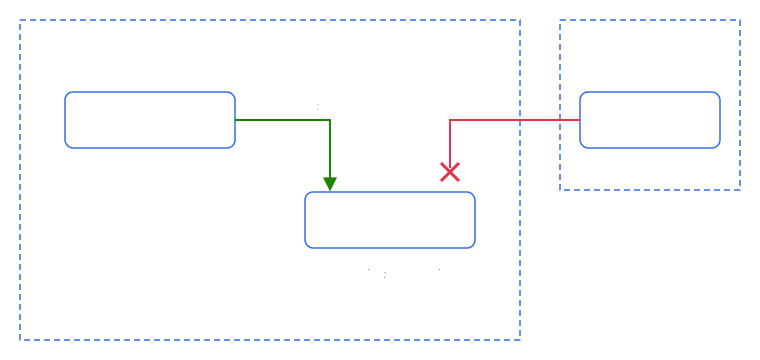
The usual pattern is a default deny for the namespace, then narrow allows on top. Here’s the setup in the diagram:
# Nothing gets into any pod in "shop" unless another policy allows it
apiVersion: networking.k8s.io/v1
kind: NetworkPolicy
metadata:
  name: default-deny-ingress
  namespace: shop
spec:
  podSelector: {}
  policyTypes: [Ingress]
---
# ...except the frontend, which may reach the backend on port 8080
apiVersion: networking.k8s.io/v1
kind: NetworkPolicy
metadata:
  name: backend-from-frontend
  namespace: shop
spec:
  podSelector:
    matchLabels:
      app: backend
  policyTypes: [Ingress]
  ingress:
    - from:
        - podSelector:
            matchLabels:
              app: frontend
      ports:
        - protocol: TCP
          port: 8080
A few things that catch people out:
- The port is the pod’s port, not the Service’s. The Service listens on 80, but the policy says 8080, because policies are applied to traffic after the Service translation has already happened.
- Indentation changes the meaning. Inside
from, anamespaceSelectorand apodSelectorin the same list item mean “pods with this label in namespaces with that label” (AND). Put them in separate items (each with its own-) and it means “either of these” (OR). One misplaced dash can open a policy up to far more than you meant. - Restricting egress breaks DNS. If you add a default deny for egress, pods can’t reach CoreDNS anymore, and everything fails with confusing name resolution errors. Allow it explicitly:
apiVersion: networking.k8s.io/v1
kind: NetworkPolicy
metadata:
  name: allow-dns
  namespace: shop
spec:
  podSelector: {}
  policyTypes: [Egress]
  egress:
    - to:
        - namespaceSelector:
            matchLabels:
              kubernetes.io/metadata.name: kube-system
          podSelector:
            matchLabels:
              k8s-app: kube-dns
      ports:
        - protocol: UDP
          port: 53
        - protocol: TCP
          port: 53
And the big one: NetworkPolicies are only enforced if your CNI supports them. Kubernetes will happily accept a policy on a cluster running plain Flannel, store it, and then do nothing with it. No error, no warning. Your “locked down” namespace is wide open. If you rely on policies, check your CNI, then test that a request you expect to be blocked really is.
When something can’t connect
When pod A can’t reach pod B (or a Service), I go through these in order:
- Are there ready endpoints?
kubectl get endpointslices -l kubernetes.io/service-name=<svc>. If it’s empty, check that the Service’s selector matches the pod labels and that the pods pass their readiness probes. - Does DNS resolve?
nslookup <svc>from a netshoot pod in the same namespace. If not, check that the CoreDNS pods are healthy, and look for an egress policy blocking port 53. - Can I reach the pod IP directly?
curl <pod-ip>:<port>from another pod. If the pod IP works but the Service doesn’t, the problem is in kube-proxy or the CNI’s Service handling. If the pod IP doesn’t work either, it’s the pod network, or a policy. - Is a NetworkPolicy in the way?
kubectl get networkpolicy -A, then read the ones that select either pod. Cilium’s Hubble shows dropped packets and the reason, which saves a lot of guessing. - Is the app listening where you think? A server bound to
127.0.0.1instead of0.0.0.0is reachable from inside its own pod and nowhere else.kubectl execinto it and check withss -tlnp. - Is the CNI itself healthy? Check its pods in
kube-system. A crashing CNI agent on one node only breaks pods on that node, which makes for some very confusing “works sometimes” bugs.
Wrapping up
The next time a Service mysteriously stops working, you’ll know there’s an EndpointSlice to check, a translation layer to inspect and a DNS lookup to test, instead of just a black box between your pods.
Next in the series: how the scheduler decides which node a pod lands on, and how to bend it to your will with affinity, taints and topology spread constraints.
Thanks for reading! If you have questions or spot a mistake, find me on twitter.